

Browser Plugin
The Browser Plugin (Browser) provides a good possibility for users to browse, search and select any kind of document in repositories.
1 Overview
With the Aloha Editor Repository API you can access different data sources. Those items will be displayed to the user with the “Browser”.
These are some specific kinds of files the user can look for:
- Websites
- Images
- Folders
- etc.
2 Usage
2.1 Linkbrowser
The Linkbrowser can be accessed via the Link Plugin
Select the text you want to add a link to or insert a new link.
Click the Browser icon and select the desired link. 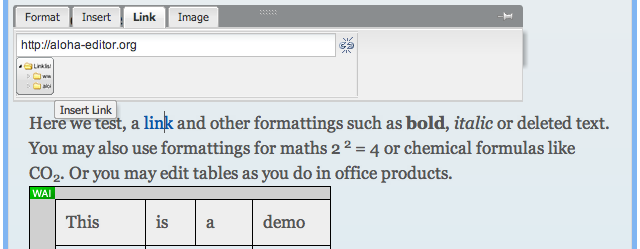
For more information navigate to the Linkbrowser Plugin
3 Components
- Button to open the browser
4 Configuration
Here we can see the default options:
	Aloha.settings.plugins: {
		browser: {
			// Set to true for development and debugging
			verbose : false,
			// The repository manager which this browser will interface with
			repositoryManager : null,
			repositoryFilter  : [],
			objectTypeFilter  : [],
			renditionFilter   : ['cmis:none'], // ['*']
			filter : ['url'],
			// DOMObject to which this instance of browser is bound to
			element : undefined,
			// root folder id
			rootFolderId : 'aloha',
			// root path to where Browser resources are located
			rootPath  : '',
			minimalWidth: 660,
			treeWidth : 300,
			listWidth : 'auto',
			// fixed page size (if adaptPageSize is false)
			pageSize  : 10,
			// set this to true for adaptive page size (based on the
			// available height and the configured rowHeight)
			adaptPageSize: false,
			// expected row height for adaptive page size.
			rowHeight: 32,
			columns : {
				icon    : {title: '',        width: 30,  sortable: false, resizable: false},
				name    : {title: 'Name',    width: 250, sorttype: 'text'},
				url     : {title: 'URL',     width: 250, sorttype: 'text'},
				preview : {title: 'Preview', width: 200, sorttype: 'text'}
			},
			isFloating : false
		}
	}
5 Extending the Browser for your needs
5.1 Build your own specific Extension
Basically you are able override every function, for example the init() to use custom options:
var MyCustomBrowser = Browser.extend({

	init: function (config, oneMoreParameter) {
		this._super(config);

		this.moreParameter = oneMoreParameter;

		... do something with it
	}
})
5.2 Customize table rows and columns
TBD
6 Capability for multiple Instances
In the current version (0.20) there is the possibility to add multiple browser instances to a page.
7 Known Issues
- Tree filter for top domains does not work in 0.20.x
 Chapters